> ## Documentation Index
> Fetch the complete documentation index at: https://docs.berachain.com/llms.txt
> Use this file to discover all available pages before exploring further.

# Borrow & Repay

> Supply collateral, borrow HONEY, monitor LTV/LLTV, and repay to withdraw collateral on Bend.

Follow these steps to supply collateral, borrow \$HONEY, and repay to free your collateral.

## Requirements

* Wallet with collateral (WETH, WBERA, WBTC, etc.) listed on [Bend](https://bend.berachain.com/borrow)
* Native \$BERA for transaction fees

<Tip>If you don't have collateral, swap on [Berachain Hub](https://hub.berachain.com/swap).</Tip>

## Supply collateral and borrow

Supply $WBERA as collateral and borrow $HONEY.

<Steps>
  <Step title="Visit Bend and connect wallet">
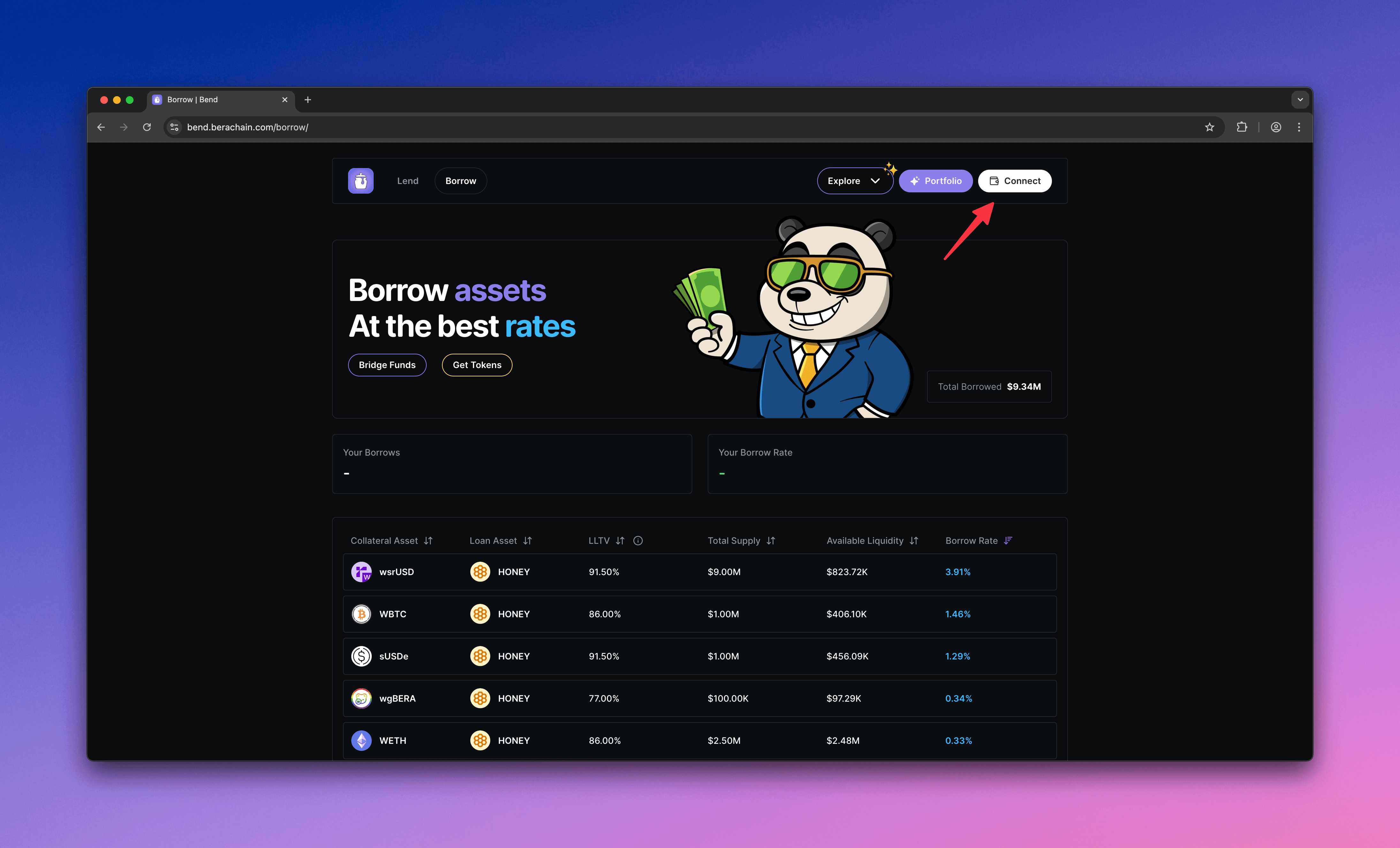
    Go to [Bend](https://bend.berachain.com/borrow) and connect your wallet.
    <Frame>
      <img src="https://mintcdn.com/berachain-422fce37/spFyXF2YSQlNtmpH/images/bend/borrow-connect-wallet.png?fit=max&auto=format&n=spFyXF2YSQlNtmpH&q=85&s=1ee0047b31fd5a3075a933d2e8037b47" alt="Bend borrow connect wallet" width="4384" height="2654" data-path="images/bend/borrow-connect-wallet.png" />
    </Frame>
  </Step>

  <Step title="Choose a market">
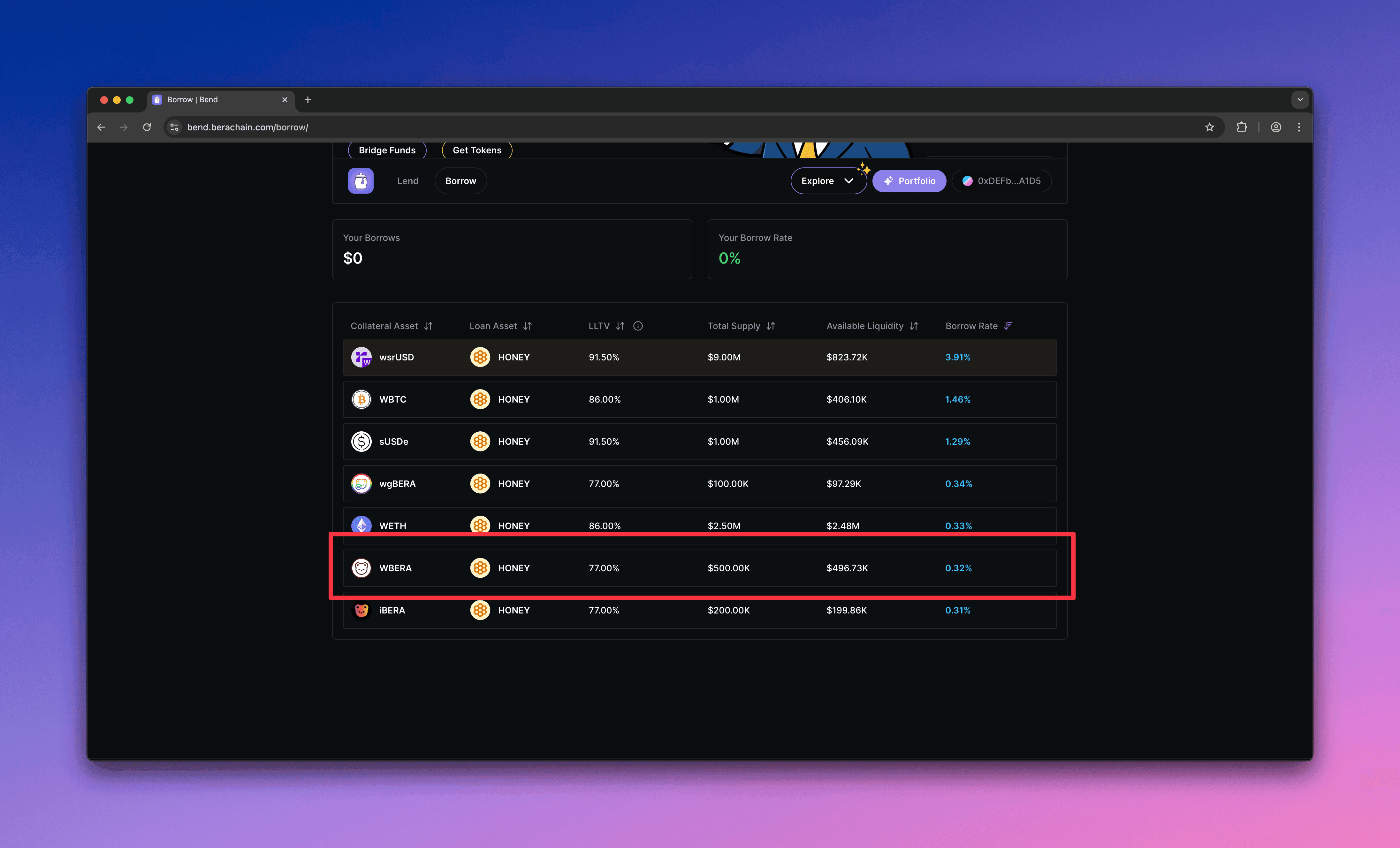
    Choose a market where you can supply collateral. This guide uses \$WBERA.
    <Frame>
      <img src="https://mintcdn.com/berachain-422fce37/spFyXF2YSQlNtmpH/images/bend/borrow-choose-market.png?fit=max&auto=format&n=spFyXF2YSQlNtmpH&q=85&s=84778d8ca9d7b6c8f925e760b4c0d656" alt="Bend choose market" width="4384" height="2654" data-path="images/bend/borrow-choose-market.png" />
    </Frame>
  </Step>

  <Step title="Configure borrow">
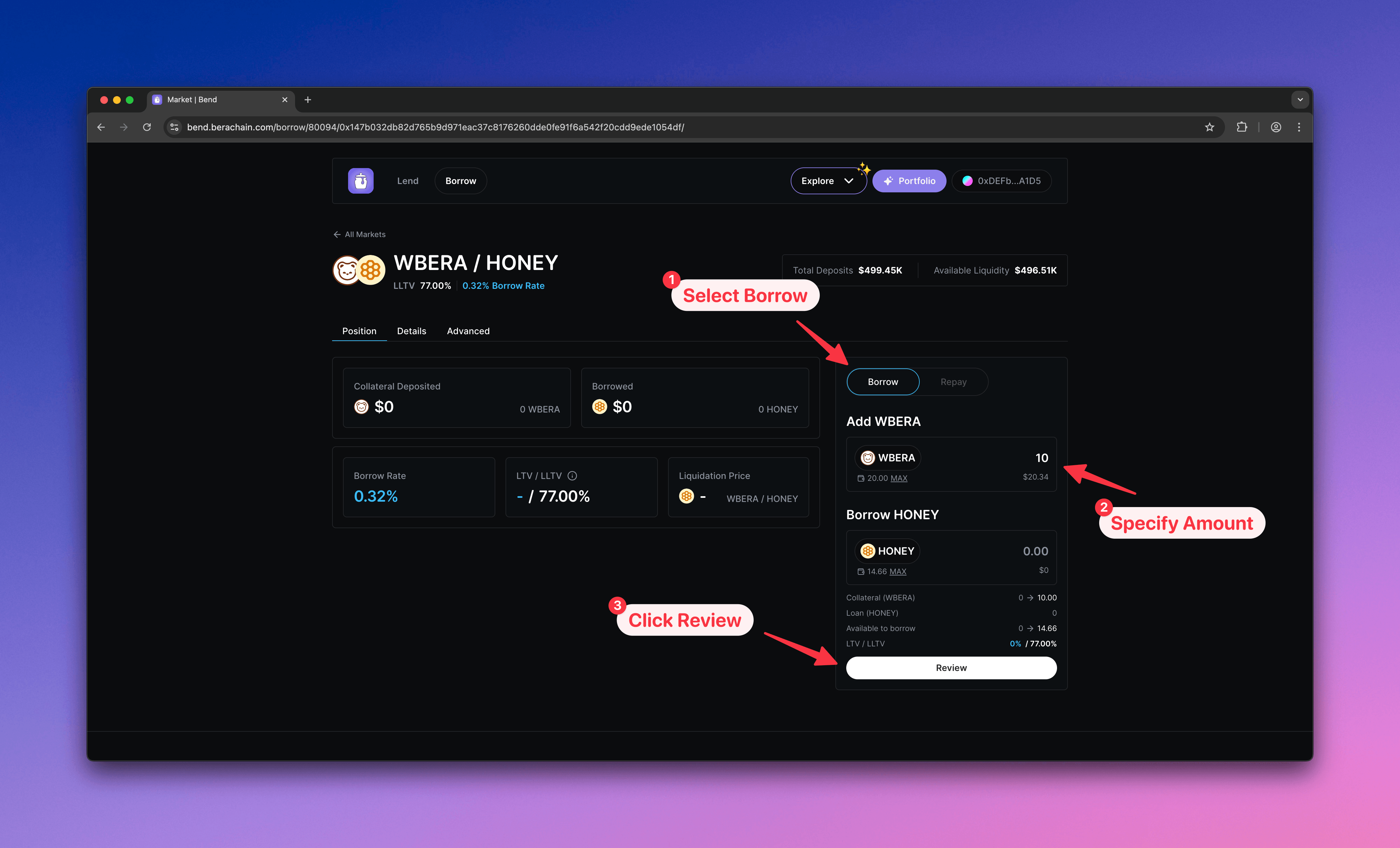
    1. Select **Borrow**
    2. Enter the \$WBERA amount to supply as collateral
    3. Click **Review** to open the confirmation modal
    <Frame>
      <img src="https://mintcdn.com/berachain-422fce37/spFyXF2YSQlNtmpH/images/bend/borrow-configure-borrow.png?fit=max&auto=format&n=spFyXF2YSQlNtmpH&q=85&s=b64871a0687f631245b8f01ceffaef65" alt="Bend configure borrow" width="4384" height="2654" data-path="images/bend/borrow-configure-borrow.png" />
    </Frame>
  </Step>

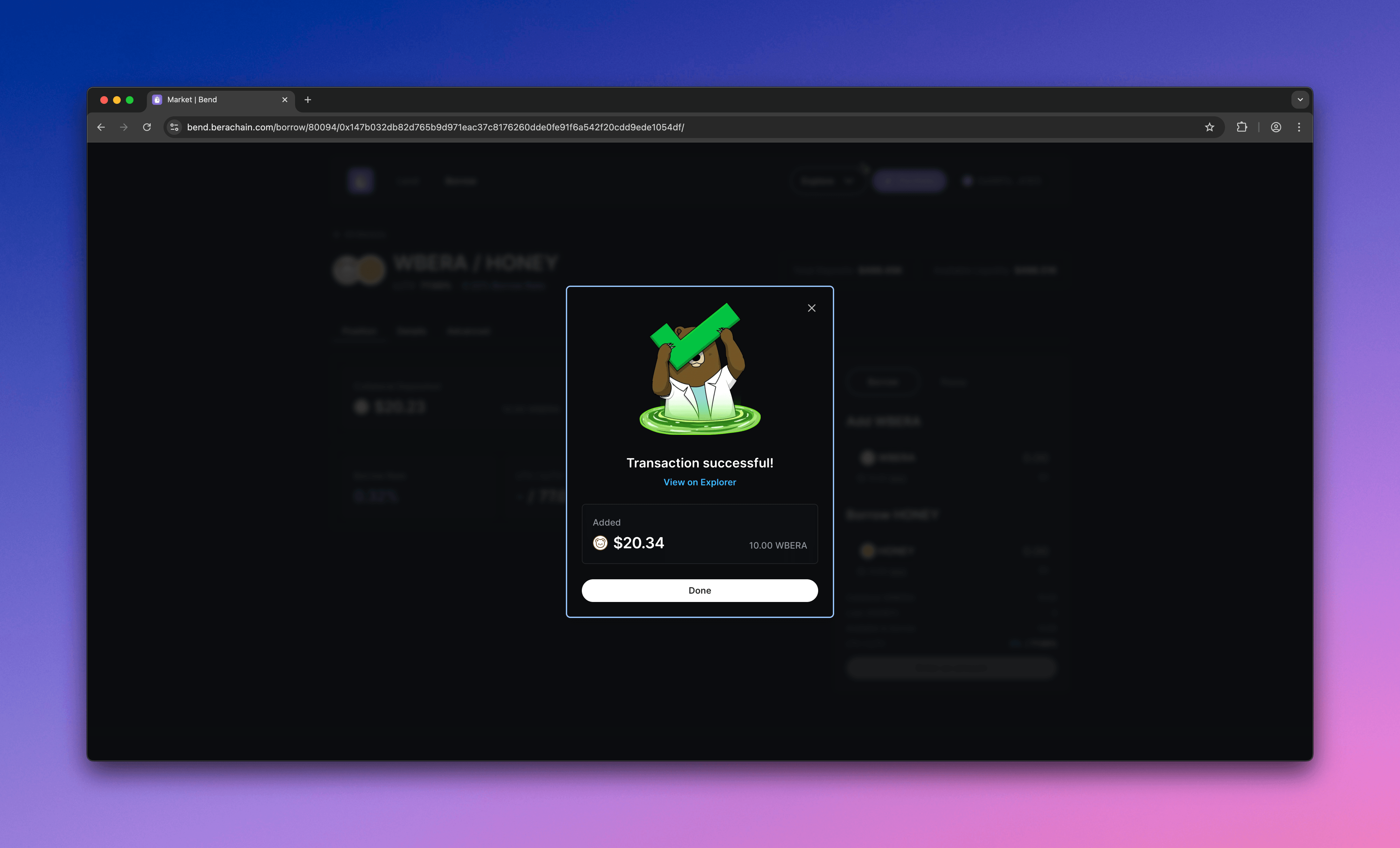
  <Step title="Approve and supply">
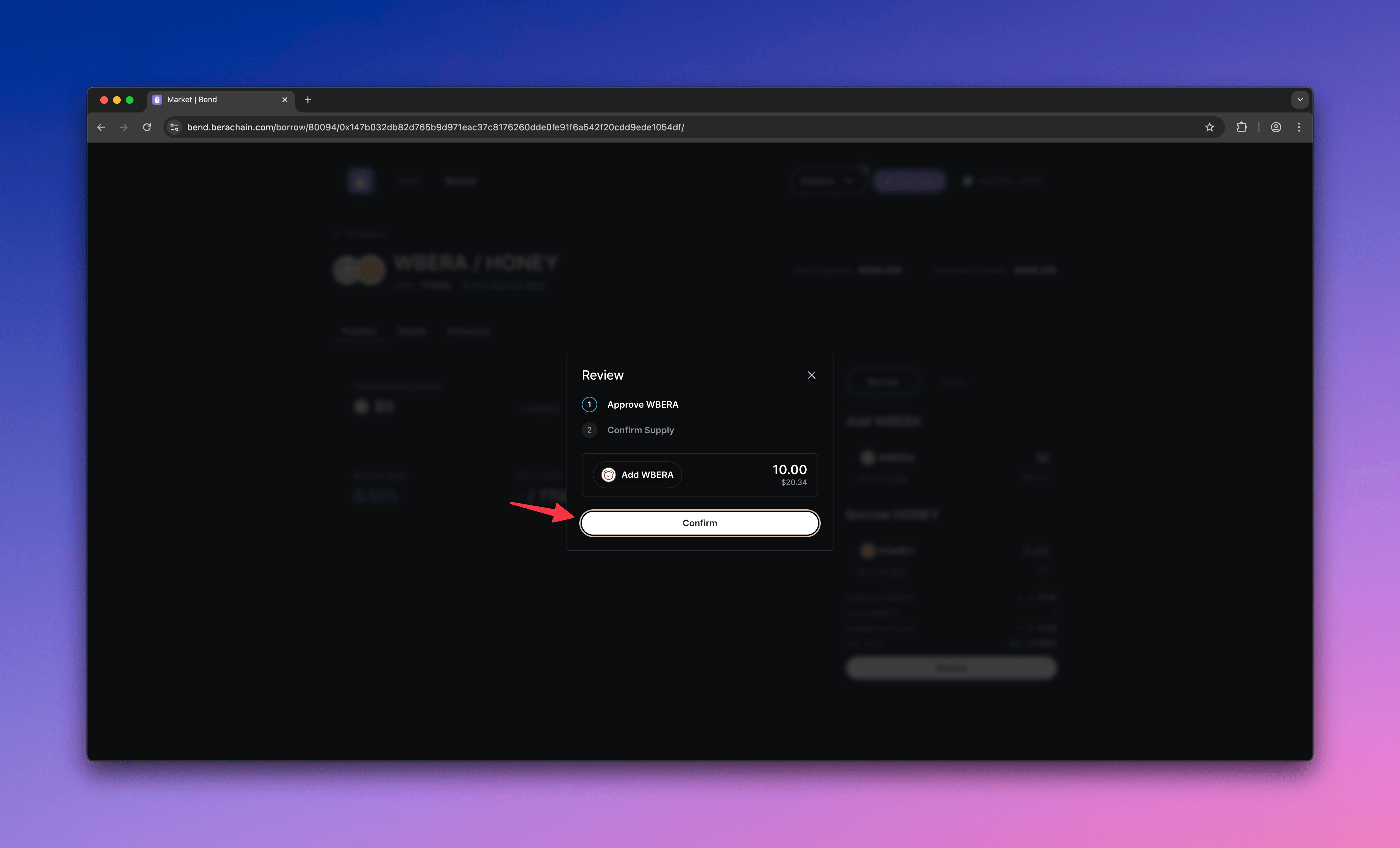
    1. Approve the market to spend your \$WBERA
    2. Supply \$WBERA as collateral
    <Frame>
      <img src="https://mintcdn.com/berachain-422fce37/spFyXF2YSQlNtmpH/images/bend/borrow-approve-supply.png?fit=max&auto=format&n=spFyXF2YSQlNtmpH&q=85&s=35222dc7161acfe72ed44b32f96a7182" alt="Bend approve and supply" width="4384" height="2654" data-path="images/bend/borrow-approve-supply.png" />
    </Frame>

    <Frame>
      <img src="https://mintcdn.com/berachain-422fce37/spFyXF2YSQlNtmpH/images/bend/borrow-successful-approve-supply.png?fit=max&auto=format&n=spFyXF2YSQlNtmpH&q=85&s=7178ed8c6f33bd0f55c6dda32e705246" alt="Bend successful approve and supply" width="4384" height="2654" data-path="images/bend/borrow-successful-approve-supply.png" />
    </Frame>

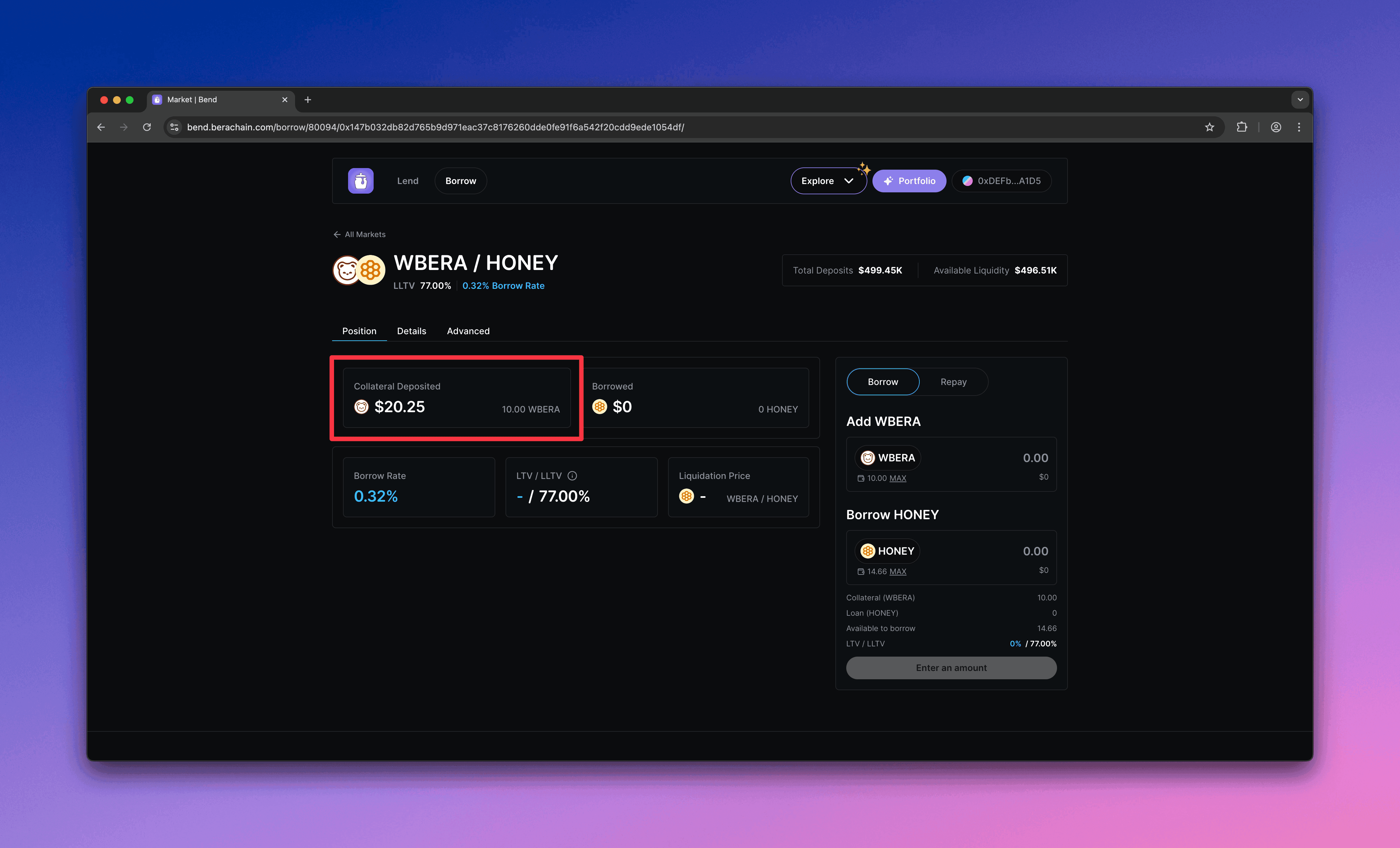
    You should see your supplied collateral and total value in the market.
    <Frame>
      <img src="https://mintcdn.com/berachain-422fce37/spFyXF2YSQlNtmpH/images/bend/borrow-successful-supply.png?fit=max&auto=format&n=spFyXF2YSQlNtmpH&q=85&s=eafc989c94be8594dcc744e9d6e2f3cc" alt="Bend successful supply" width="4384" height="2654" data-path="images/bend/borrow-successful-supply.png" />
    </Frame>
  </Step>

  <Step title="Borrow">
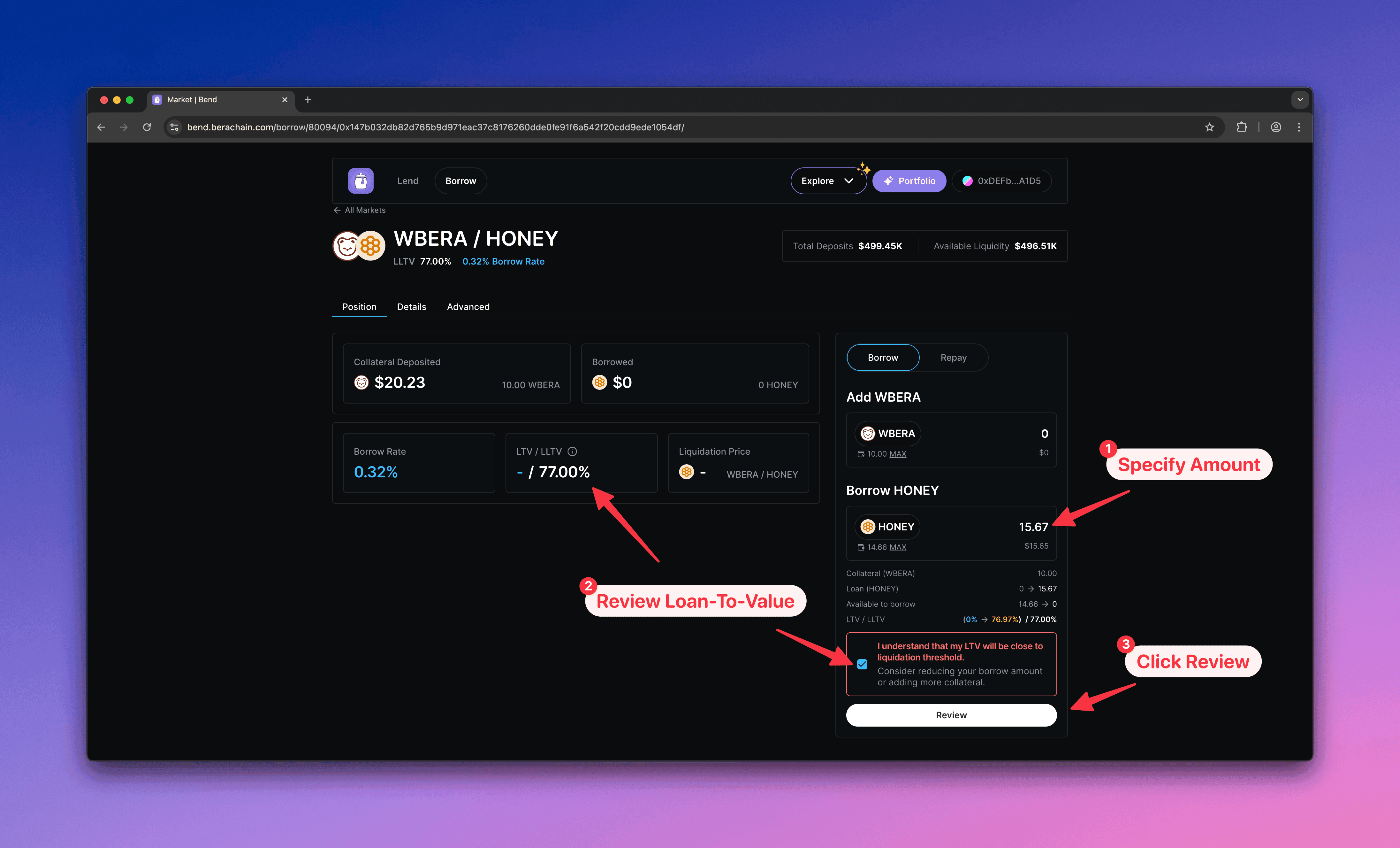
    1. Enter the \$HONEY amount to borrow
    2. Keep borrow below the LTV limit to avoid liquidation
    3. Click **Review** to confirm
    <Frame>
      <img src="https://mintcdn.com/berachain-422fce37/spFyXF2YSQlNtmpH/images/bend/borrow-borrow.png?fit=max&auto=format&n=spFyXF2YSQlNtmpH&q=85&s=f2188dd5e5855618373a7e3143bf3f5a" alt="Bend borrow" width="4384" height="2654" data-path="images/bend/borrow-borrow.png" />
    </Frame>
  </Step>

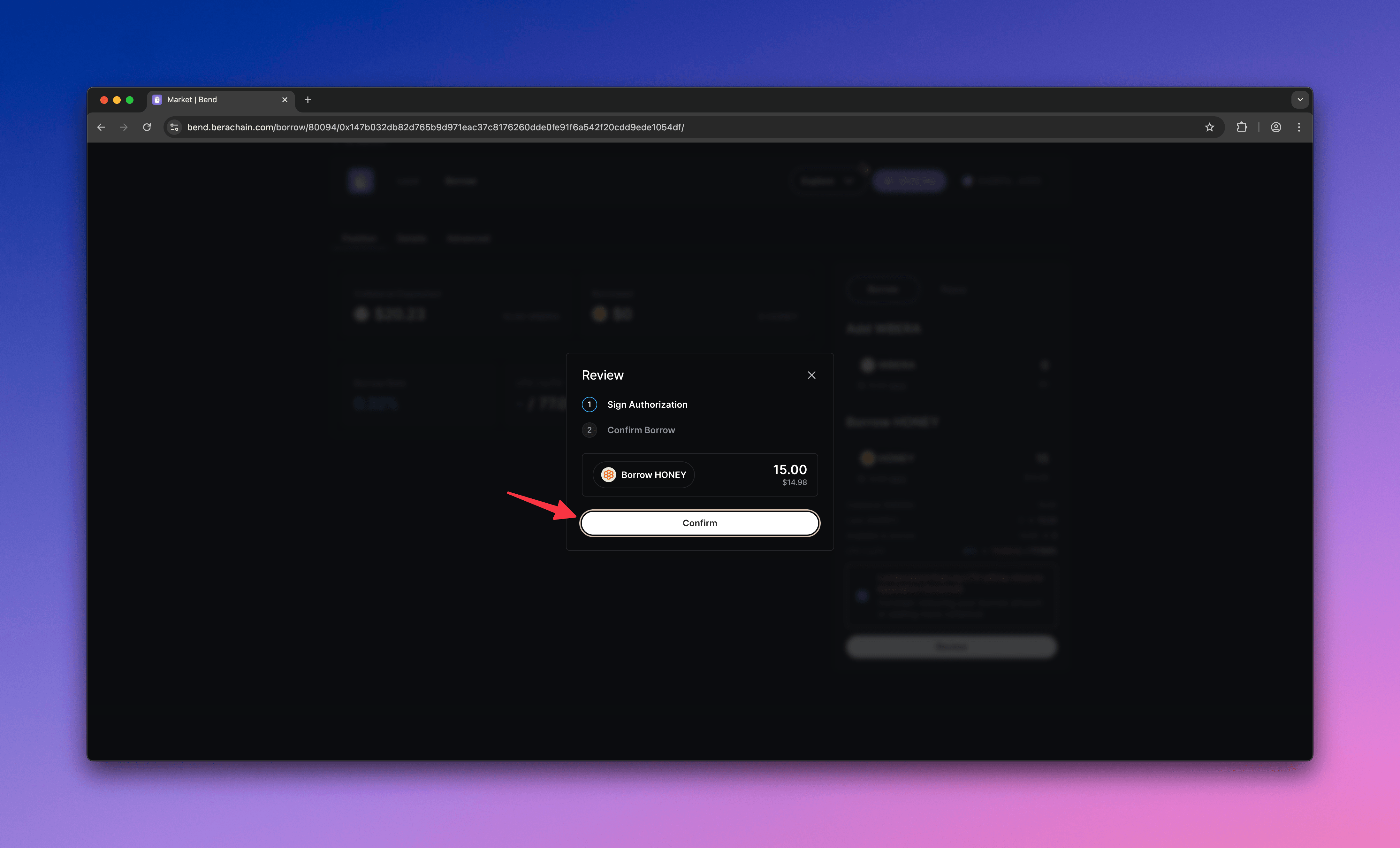
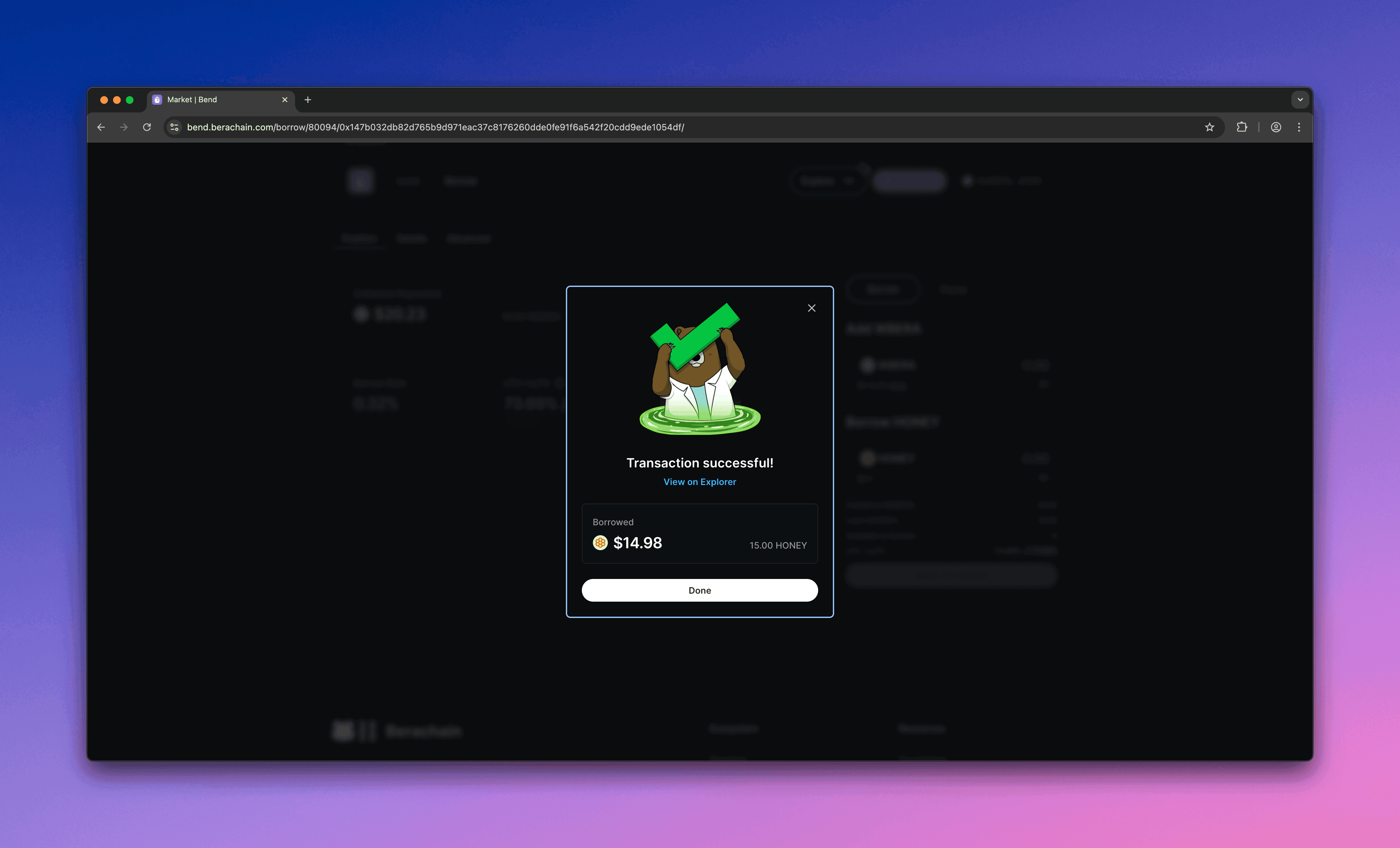
  <Step title="Approve and borrow">
    Approve the borrow in your wallet.

    <Frame>
      <img src="https://mintcdn.com/berachain-422fce37/spFyXF2YSQlNtmpH/images/bend/borrow-approve-borrow.png?fit=max&auto=format&n=spFyXF2YSQlNtmpH&q=85&s=b71e93a5e64aaf1ee0af5c4fe1f33a5f" alt="Bend approve borrow" width="4384" height="2654" data-path="images/bend/borrow-approve-borrow.png" />
    </Frame>

    <Frame>
      <img src="https://mintcdn.com/berachain-422fce37/spFyXF2YSQlNtmpH/images/bend/borrow-successful-approve-borrow.png?fit=max&auto=format&n=spFyXF2YSQlNtmpH&q=85&s=5ddc3db75c4ccd55804833cf5e10da3f" alt="Bend successful approve borrow" width="4384" height="2654" data-path="images/bend/borrow-successful-approve-borrow.png" />
    </Frame>

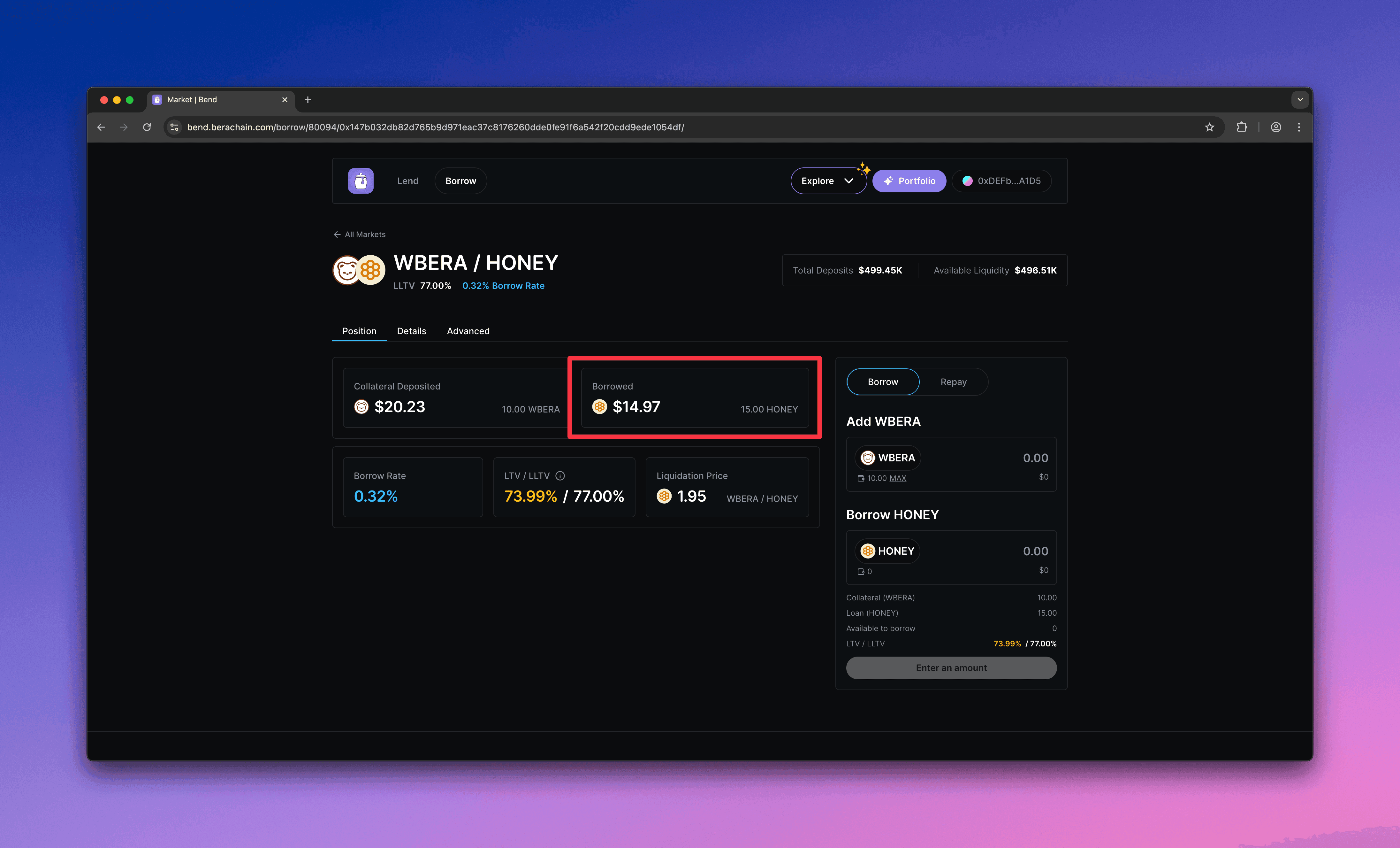
    You should see your borrowed \$HONEY and its value in the market.
    <Frame>
      <img src="https://mintcdn.com/berachain-422fce37/spFyXF2YSQlNtmpH/images/bend/borrow-successful-borrow.png?fit=max&auto=format&n=spFyXF2YSQlNtmpH&q=85&s=6cf9eb68466290508e9addd826b00f79" alt="Bend successful borrow" width="4384" height="2654" data-path="images/bend/borrow-successful-borrow.png" />
    </Frame>
  </Step>

  <Step title="Avoid liquidation">
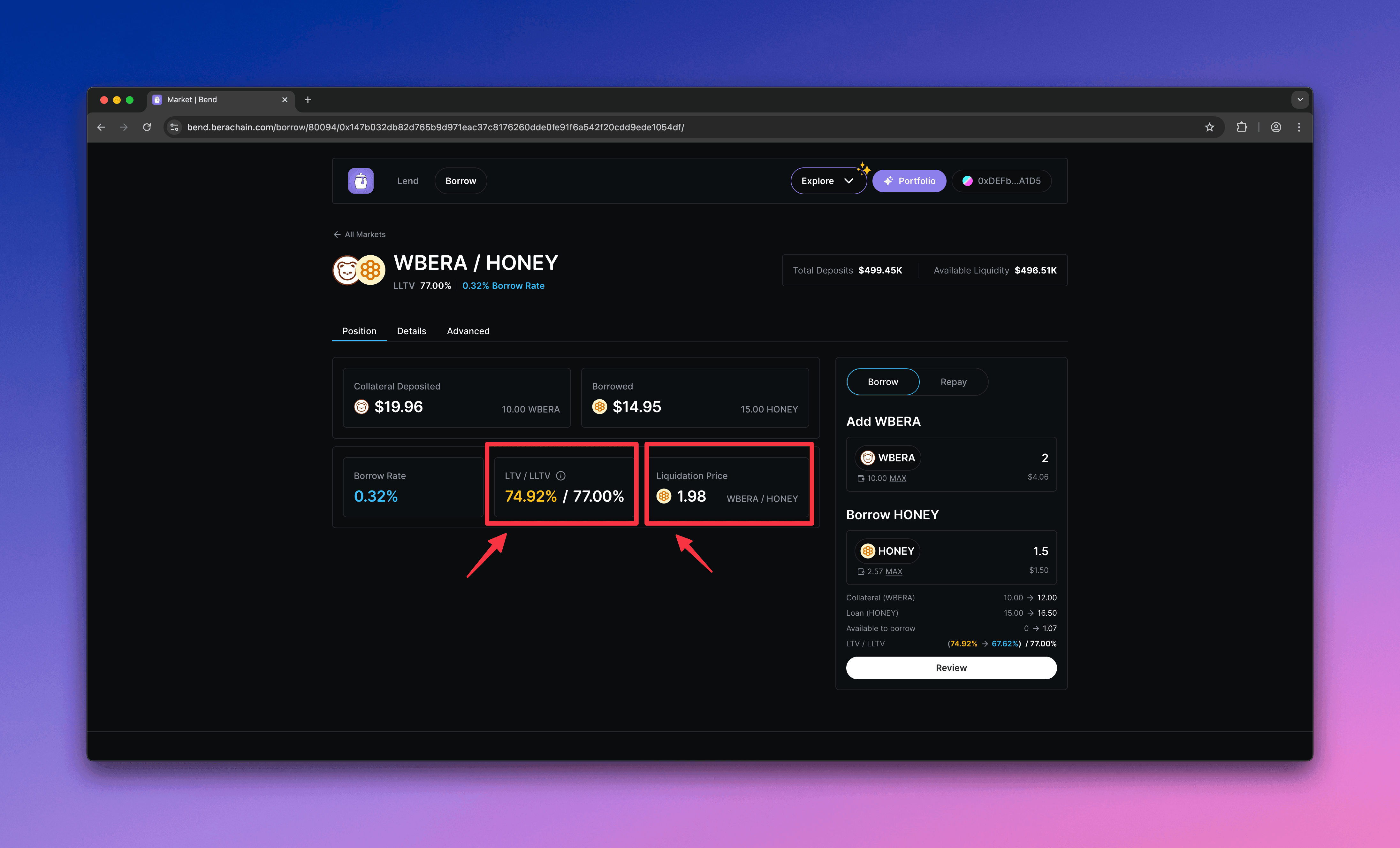
    Monitor your position. If your LTV exceeds the Liquidation LTV (LLTV), your position can be liquidated.
    <Frame>
      <img src="https://mintcdn.com/berachain-422fce37/spFyXF2YSQlNtmpH/images/bend/borrow-monitor-ltv-lltv.png?fit=max&auto=format&n=spFyXF2YSQlNtmpH&q=85&s=192b7dce13a22e3e416854492f51c4d6" alt="Bend monitor LTV and LLTV" width="4384" height="2654" data-path="images/bend/borrow-monitor-ltv-lltv.png" />
    </Frame>
  </Step>
</Steps>

## Repay and withdraw

Repay $HONEY and withdraw your $WBERA collateral.

<Steps>
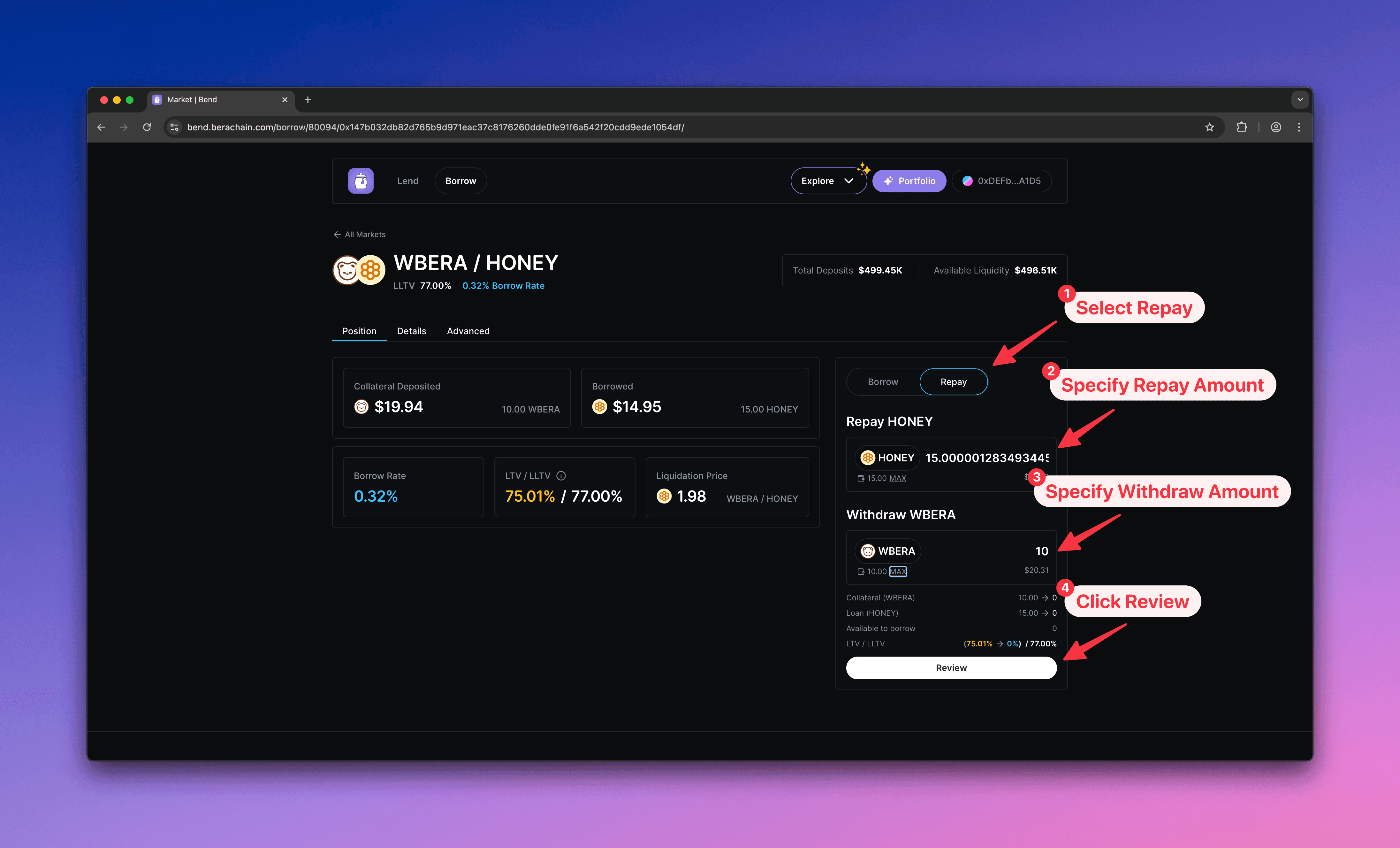
  <Step title="Configure repay">
    1. Select **Repay**
    2. Enter the \$HONEY amount to repay
    3. Enter the \$WBERA amount to withdraw
    4. Click **Review** to open the confirmation modal
    <Frame>
      <img src="https://mintcdn.com/berachain-422fce37/spFyXF2YSQlNtmpH/images/bend/repay-configure-repay.png?fit=max&auto=format&n=spFyXF2YSQlNtmpH&q=85&s=2fa0c4014a7f32907293c5536ff2e1db" alt="Bend configure repay" width="4384" height="2654" data-path="images/bend/repay-configure-repay.png" />
    </Frame>
  </Step>

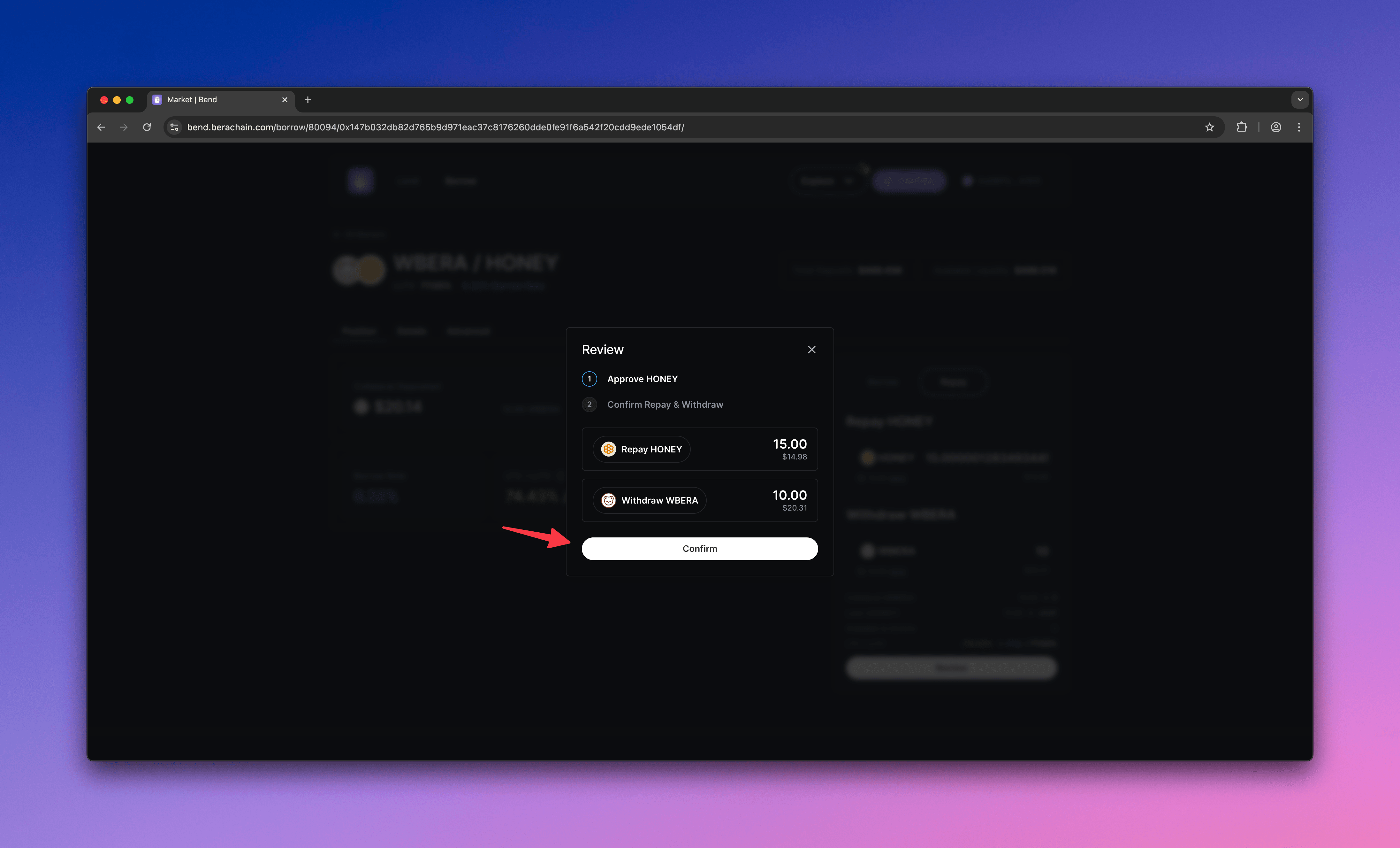
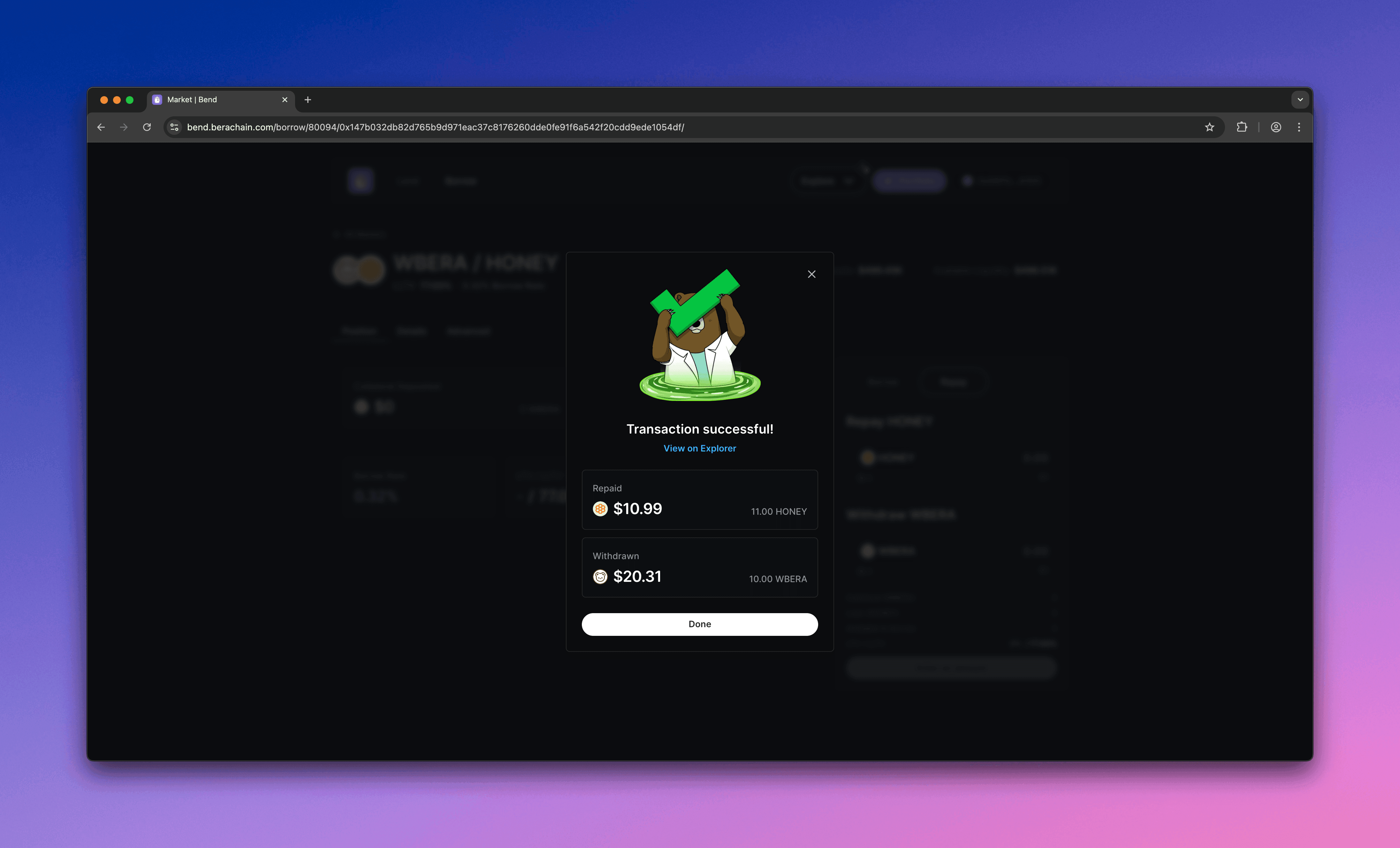
  <Step title="Confirm repay">
    Confirm the repayment in your wallet.
    <Frame>
      <img src="https://mintcdn.com/berachain-422fce37/spFyXF2YSQlNtmpH/images/bend/repay-confirm-repay.png?fit=max&auto=format&n=spFyXF2YSQlNtmpH&q=85&s=1d305cc585d90406ba89f8f9a6a2098d" alt="Bend confirm repay" width="4384" height="2654" data-path="images/bend/repay-confirm-repay.png" />
    </Frame>

    <Frame>
      <img src="https://mintcdn.com/berachain-422fce37/spFyXF2YSQlNtmpH/images/bend/repay-successful-confirm-repay.png?fit=max&auto=format&n=spFyXF2YSQlNtmpH&q=85&s=c5602a4631284a595a039b49e6c44002" alt="Bend successful confirm repay" width="4384" height="2654" data-path="images/bend/repay-successful-confirm-repay.png" />
    </Frame>

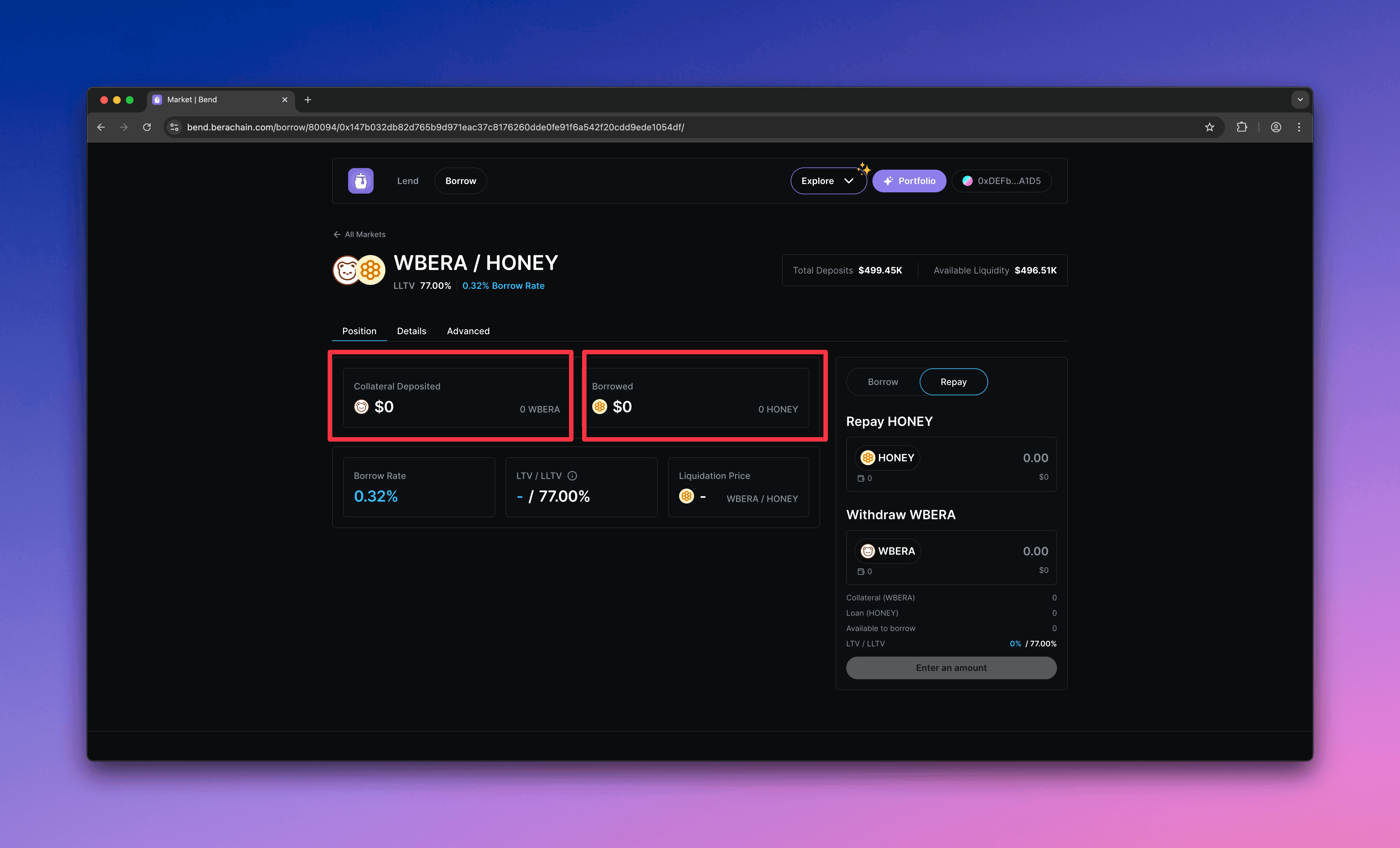
    You should see a zero balance after the repayment.
    <Frame>
      <img src="https://mintcdn.com/berachain-422fce37/spFyXF2YSQlNtmpH/images/bend/repay-successful-repay.png?fit=max&auto=format&n=spFyXF2YSQlNtmpH&q=85&s=baebe15345de4629f9a788553dd9c933" alt="Bend successful repay" width="4384" height="2654" data-path="images/bend/repay-successful-repay.png" />
    </Frame>
  </Step>
</Steps>

You have now supplied collateral, borrowed \$HONEY, and repaid to withdraw your collateral on Bend.